If you do not have the program, or want the latest installation version of the
software, you may download the self-extracting
installer. This installer loads the same software sent on CD - with
limited 'demo' data.
|
Paulding County Is Expected!
The demo software, by default, will load a demo database
containing Paulding County data, Allgood precinct. The standard software sent on CD should
auto-load your data. However, if it did not please see the instructions for "Loading Data" - this information is included on the instructions
included with the CD you received. They are also repeated below.
|
Update
Users looking for the Latest Version of the program should use Help->Update from within VSU
if possible - but you may also Click Here to download the latest
installation version (Last Updated: [an error occurred while processing this directive]).
Loading Data
After installing the VSU Demo and running it, you will likely be presented with an empty
database or one for Paulding County for demo purposes. If we sent you a CD with your data
it should immediately inform you it found your database and ask you if you want to load it.
However, if you ordered a second database or loaded the demo prior to purchasing
a list, then you may, from within the VSU opening screen, click on Tools->Load Databases. Navigate to
the CD-ROM drive and select the voter database from the CD. It will likely be
the only selection in the window. If there is more than one selection then the
name should explain which database you are loading. After the data loads, you
will be asked to create lookups and indexes, answer yes. Once the lookups and indexes
are built your installation is complete.
FAQs
Program "Hangs" while loading voters
When the program opens it will attempt to load the last voter data list
accessed. The status bar on the bottom of the screen will say "Loading
Voters". This may take a while, depending upon the number of voters, the
speed of your computer, and several other factors. Be Patient.
Basic User
Information
Performing Searches
The various
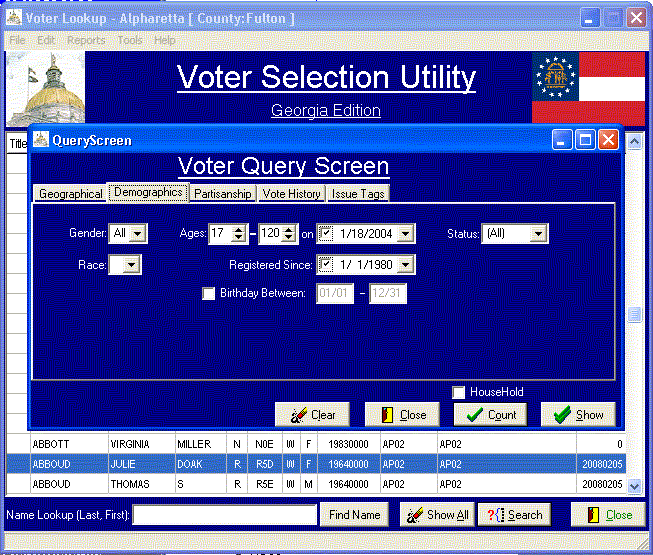 pull-down windows, radio boxes, and text fields may be used to define search
criteria. Select the political
district, precinct, voter rating (Party Lean, Party Strength, and Persistence),
and other parameters prior to clicking on “Search”. Search will query the database for all records meeting the
specified criteria. Be aware, the voters
must meet ALL selected criteria. The
exception to the “all” rule is in evaluating voter history. When any of the search parameters are
changed the “Search” key will become enabled.
pull-down windows, radio boxes, and text fields may be used to define search
criteria. Select the political
district, precinct, voter rating (Party Lean, Party Strength, and Persistence),
and other parameters prior to clicking on “Search”. Search will query the database for all records meeting the
specified criteria. Be aware, the voters
must meet ALL selected criteria. The
exception to the “all” rule is in evaluating voter history. When any of the search parameters are
changed the “Search” key will become enabled.
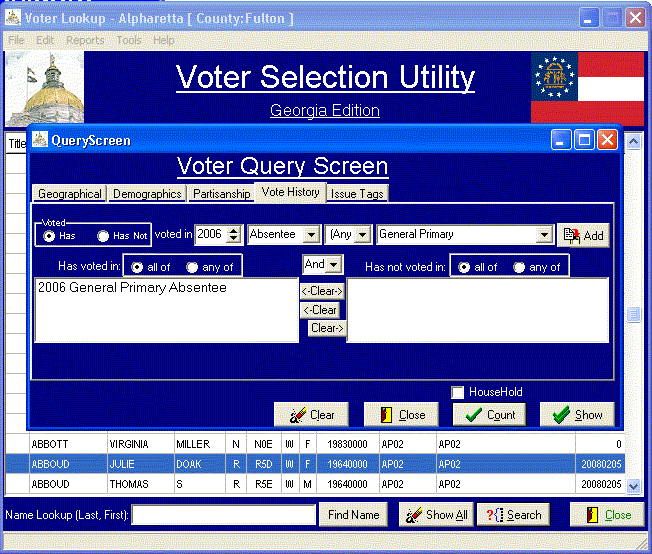
Clicking the
“Search” key will execute the query.
When performing history based queries you must select the party (if
applicable), the election year, and the election type and click “Add”. You may submit multiple elections to the
query and require “All” or “Any” of the elections exist. All search results
are utilized by the reporting features available in the program. The
extensive search features allow you to peform targeted calling, precinct
walking, or direct-mail. Imagine being able to target seniors, or college
students, or young women versus older men and tailoring your message to
the audience without the need for a consultant or custom-mail house!
Clearing Searches
The “Clear” or
“CLR” button resets the system to all voters.
The button may not be accessible if there has been no prior search done
– in which case all voters are currently visible.
Name Searches
The Name Search
field is an exception to the rule. Name
Search is not included in the normal search defined above. Name Search will locate the specified name
or nearest match in the currently selected list of voters and position the
voter window to that location.
View Voter
Double-clicking
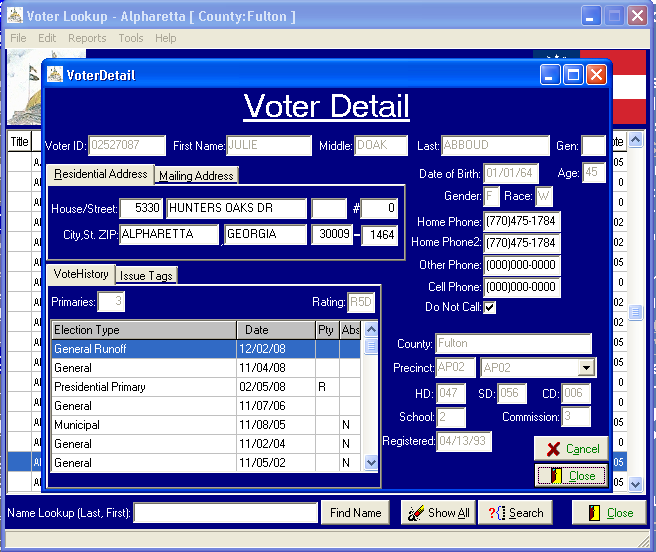 on a voter’s record will cause the voter information screen to appear. This screen contains contact, mailing, and
voter history information.
on a voter’s record will cause the voter information screen to appear. This screen contains contact, mailing, and
voter history information.
Voter Selection Utility Information
Reporting Information
Report Selection
After selecting
the voters you wish to report you may click on Report. You will be given the options including Mail Merge, Lists, and Analysis.
Mail Merge allows
you to use a previously created mailmerge document and merge it with the
selected voters. Mailmerge fields are
FirstName, LastName, MailAddr, MailCity, MailState, MailZIP, and MailZIP4. Sample documents are in the “Documents”
directory within the VSU directory. A sample letter document and envelope
document are provided.
Under Lists you will find Walk List or Call List. Clicking on Walk
List will provide several report options as will Call List. The explanations define the difference
between the reports.
Under Analysis you will see voter rating
quantified in various ways.
The primary
purpose of the Tools option is to allow the loading of voter data from the
CD. Load Database is the primary tool to use. Other options are provided in the event something went wrong with
the database load or a program update requires new indexes.
File provides a
means of exiting the program but also allows for the closing the current voter
file, opening another voter file, and exporting selected data to a DBASE file
for use with mailmerge or query programs not compatible with VSU.
Help has several
options. The About option provides program
version information. Help & Tips will start your web
browser and take you to a help page at the PDS web site. Update
will allow you to download revisions to this program. It is recommended that you check for updates periodically.

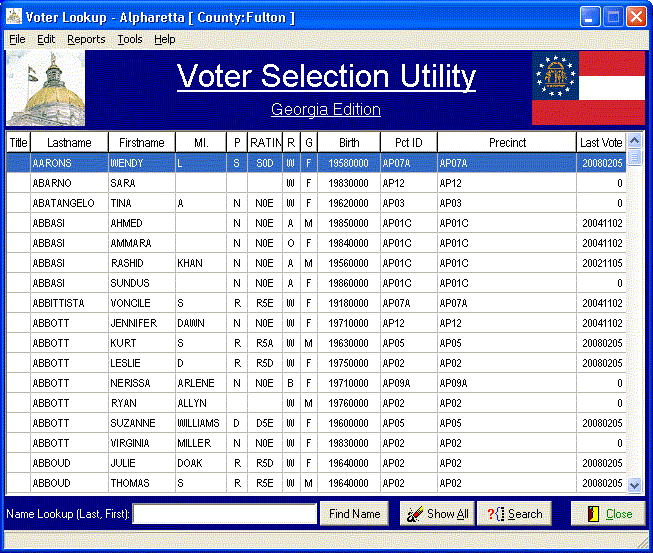 Our voter list products include our new and improved "Voter Selection Utility"
version 2.0! With this utility you can easily and efficiently work with your
voter data and you'll have little need for a "computer guru" to assist you
with targeting voters, printing precinct walk or call lists, or even generating
mailhouse lists or printing your own labels - we even provide sample templates
(Microsoft Word and basic skills are required). Consider downloading our demo and give it a try - we think you'll be pleased.
Our voter list products include our new and improved "Voter Selection Utility"
version 2.0! With this utility you can easily and efficiently work with your
voter data and you'll have little need for a "computer guru" to assist you
with targeting voters, printing precinct walk or call lists, or even generating
mailhouse lists or printing your own labels - we even provide sample templates
(Microsoft Word and basic skills are required). Consider downloading our demo and give it a try - we think you'll be pleased.
